Pegasus4i · client workspace
How to use your workspace
The workspace is where Pegasus4i clients see where they stand, plan their agent team and track the work. This guide walks through every part of it: what each tool answers, how to fill it in, and how to read what comes back.
The latest version of this guide is always at app.pegasussource.ai/guide. Screens show Silver Lake Financial Group, a fictitious company, as sample data.
01Start here
Three things to do in your first visit.
1 · About 5 minutes
Find where one workflow waits. List the steps of one real workflow with rough times.
2 · About 5 minutes
Size it and map it. Put a number on the longest wait, then mark which decisions stay with your people.
3 · About 3 minutes
Take the read. Eight questions on how you run IBM i. The ROI model and your read page start from your score.
You can take the read first if you prefer; it’s the one thing you can do before you even have a workspace. You don’t need to remember the order. The Your next step card at the top of your home page always shows the one thing worth doing next, worked out from what you’ve already done.
Everything you save stays in your workspace. When you talk to the Pegasus4i team, the conversation starts from what you’ve already found rather than from a blank page.
02Signing in
No password. Your work email is your key.
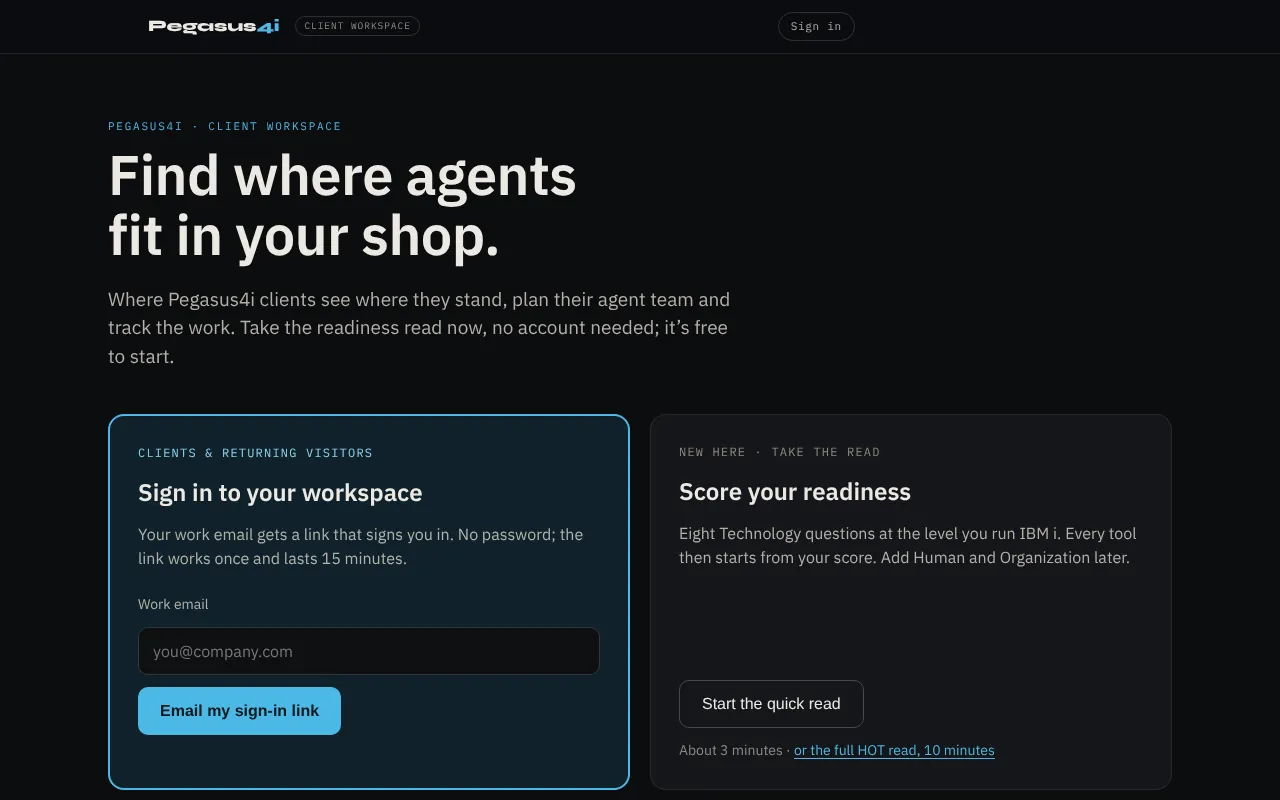
- Go to app.pegasussource.ai and enter your work email in Sign in to your workspace.
- We email you a link. Open it on the same device and choose Open my workspace.
- You’re in. The link works once and expires after 15 minutes; ask for a new one any time.
The first time, you’ll be asked to agree to the Privacy Notice before your workspace is created. After that, signing in is just the email and the link.
If the email doesn’t arrive
Give it a minute, then check spam or promotions. It comes from Pegasus4i. The check-email screen lets you send it again or use a different address.
To sign out, select your initials at the top right of the workspace and choose Sign out.
03Your home page
Everything you’ve done, and what comes next, on one page.
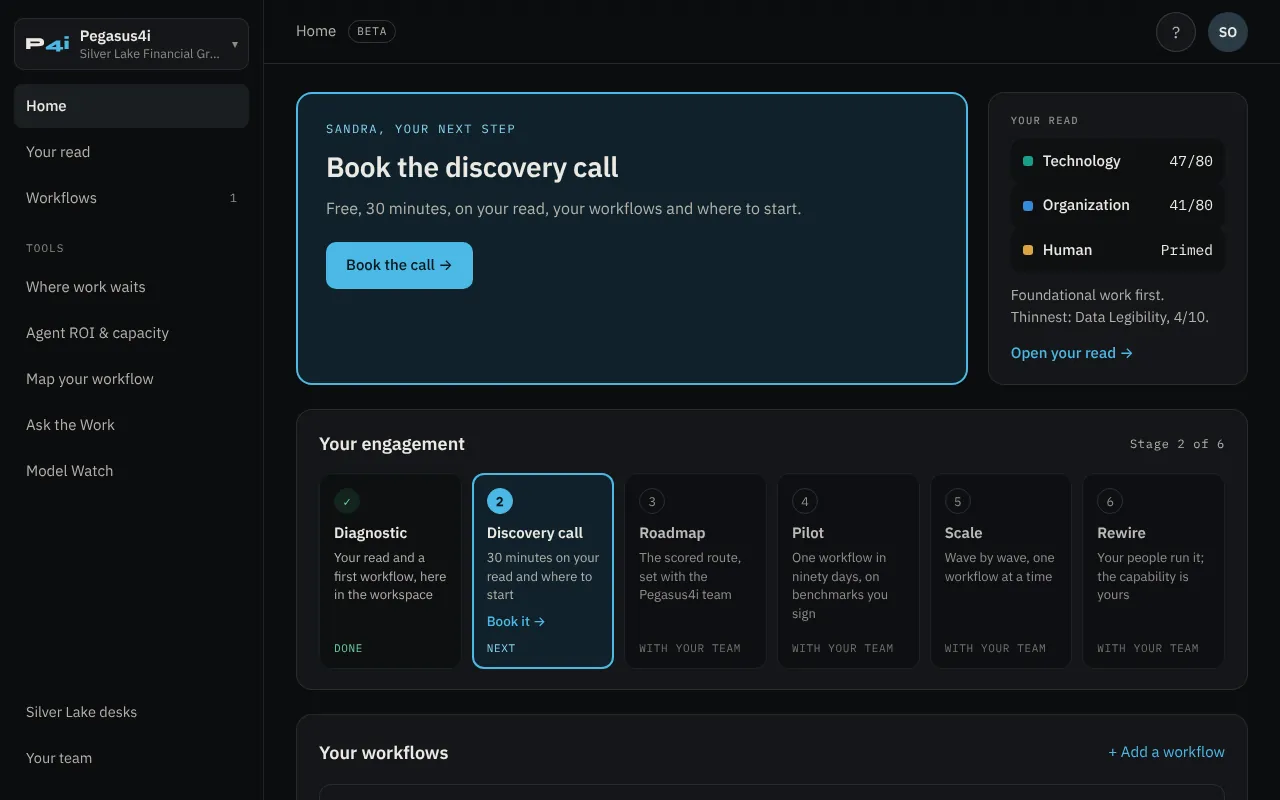
| Part | What it shows |
|---|---|
| Your next step | The one thing worth doing next. It moves on as you work: find a wait, size it, map it, then book the discovery call. If you haven’t taken the read, it offers that too. |
| Your read | Your Technology, Organization and Human scores, kept separate. Add fills in a missing one; Open your read shows every area. |
| Your engagement | Every stage of working with Pegasus4i, with the stages you’ve finished ticked. See section 11. |
| Your workflows | One row per workflow, with a tick for each tool you’ve run on it: Wait found, Sized, Mapped. Select a tick to open that tool on that workflow. |
| Documents | What you’ve saved, newest six first, with a link to everything by workflow. Your Roadmap, and a Blueprint if you want one, are filed here too when they’re ready. |
| Your team | The people behind your engagement and the link to book time with them. |
| Tools | Every tool, each with a one-line status, such as “Saved · $74,039 capacity”. |
The menu on the left holds every tool. On a phone, the same things sit in the bar along the bottom of the screen.
04Your read
Where you stand, scored against published anchors. Every tool starts from it.
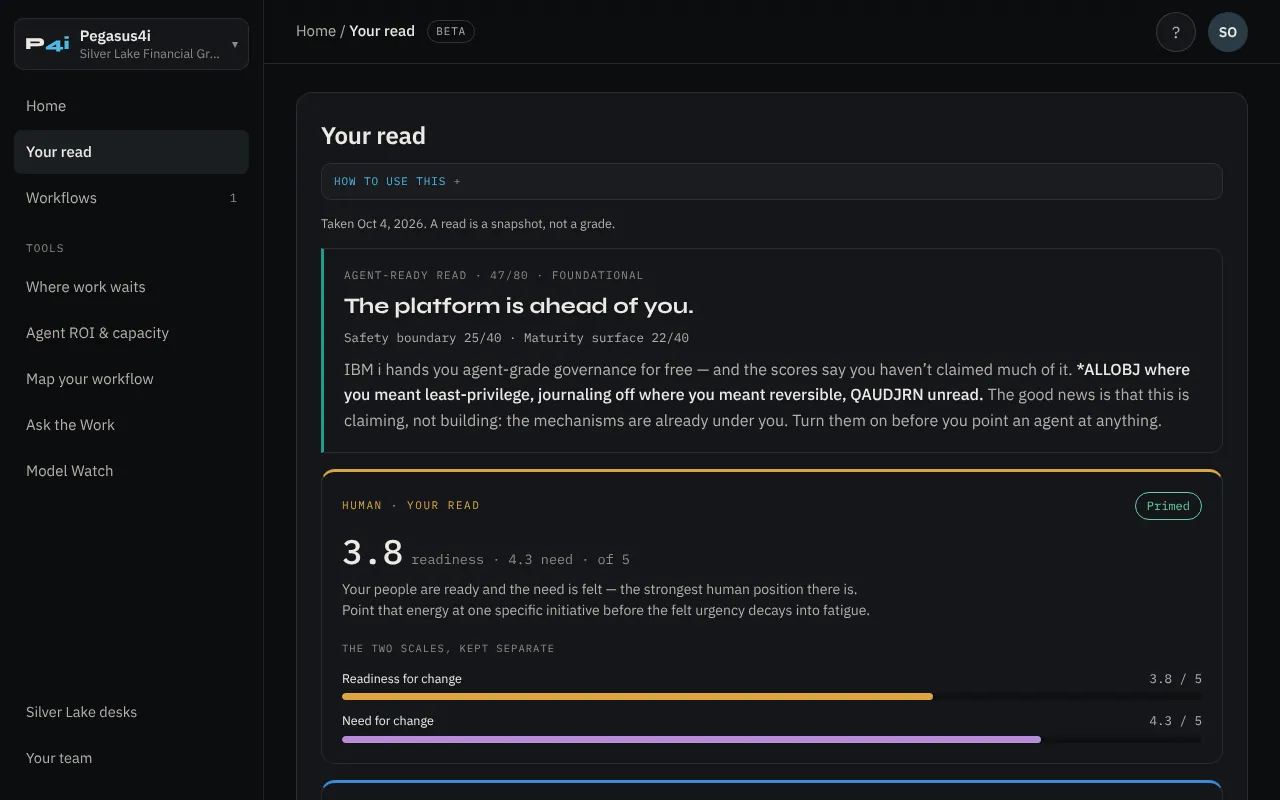
The Agent-Ready Read
Eight questions on how you run IBM i, about three minutes. Each area is scored 1 to 10, for a total out of 80. The first four areas are your safety boundary; the last four are your maturity surface.
| Safety boundary | Maturity surface |
|---|---|
| Leakage Prevention | Intelligence Stack Maturity |
| Workload Identity | Data Legibility |
| Reversibility | Autonomy Discipline |
| Human Accountability | Observability |
Your total lands in one of three bands:
- 56–80 Production-ready. The platform can carry agents into real work.
- 33–55 Foundational work first. Most shops land here. There’s specific work to do before agents widen.
- 0–32 Not yet safe to widen. Start with the safety areas before any agent touches production.
The read also gives a short verdict from the two halves, each scored out of 40. A half counts as strong at 28 or more.
| Verdict | What it means |
|---|---|
| Reachable and governed | Strong on both halves. |
| Governed, but closed | Strong safety, thin maturity. The platform will let an agent act safely; what’s missing is access to the logic and data. |
| Open, but ungoverned | Strong maturity, thin safety. Agents can reach in; the controls haven’t caught up. |
| The platform is ahead of you | Neither half is strong yet, but IBM i already gives you mechanisms you haven’t switched on. |
The full HOT read
Add the other two dimensions any time from your read or your home page, or take all three together in about ten minutes.
- Organization: eight areas from ExO 3.0, 1 to 10 each, out of 80.
- Human: eight statements on a 1–5 scale, scored as two separate numbers, readiness and need. Together they place you as Primed; Ready, unconvinced; Willing but unequipped; or Stuck.
The three dimensions are never added into one score. A strong platform doesn’t make up for an organization that can’t carry the change, and the read keeps that visible.
Retaking it
A read is a snapshot, not a grade. Retake it whenever something changes; the new read replaces the one you saved.
05Where work waits
How much of a workflow’s time is work, and how much is waiting.
Most workflows spend far more time waiting than being worked on. Making the work faster barely touches the total; removing the longest wait usually does. This tool shows you which is true for one of yours.
Filling it in
- Name the workflow. Pick one with lots of hand-offs: renewals, onboarding, claims, collections.
- Add each step. For each one, enter the hands-on work time and how long the case waits before that step starts. Note who or what it waits on.
- Use rough numbers. The gap between work and wait is usually so wide that precision doesn’t change the answer. Wait time is calendar time, so a weekend counts.
Not sure where to begin? Load an example fills in a sample workflow you can edit.
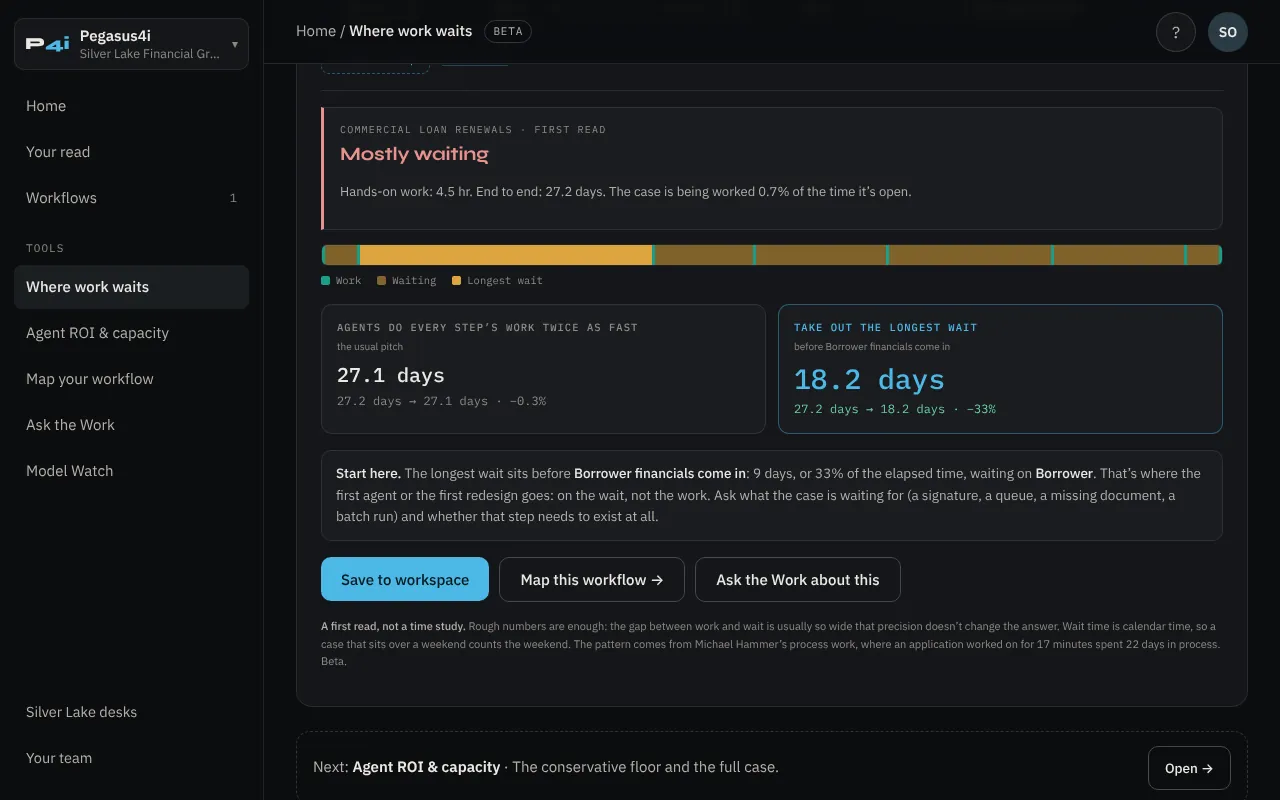
Reading the result
- The verdict is Mostly waiting, Waiting outweighs the work, or The work itself is the constraint, based on the share of elapsed time the case is actually being worked.
- The bar shows each step’s work and wait to scale, with the longest wait highlighted.
- Two comparisons put the usual pitch, “agents do every step twice as fast”, beside taking out the longest wait.
- Start here names the step to look at first and what it’s waiting on.
Select Save to workspace to keep it. The workflow then appears on your home page, ready to size and map.
06Agent ROI & capacity
What handing work to agents is worth: a conservative floor and a full case.
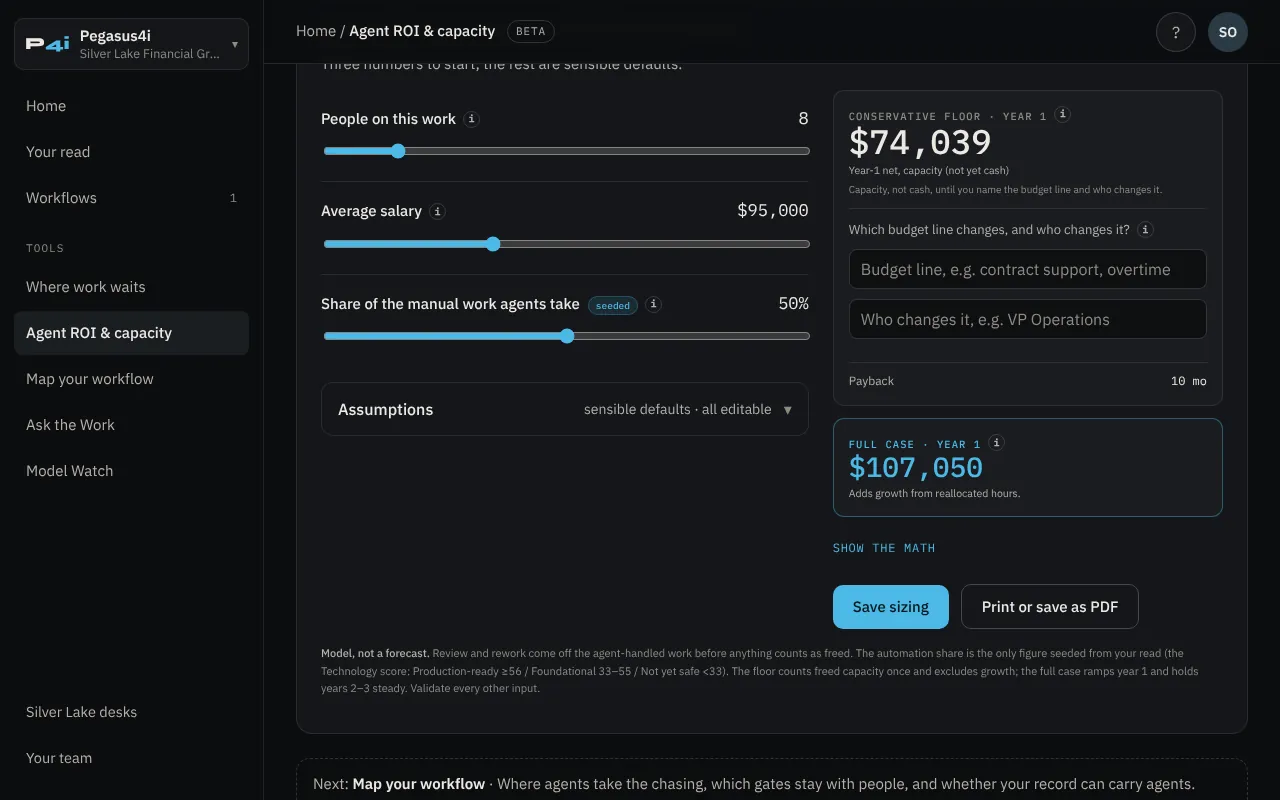
Open it from a workflow’s Sized tick and the sizing is filed against that workflow. Three numbers get you started; everything else has a sensible default you can change.
The three numbers
| People on this work | Full-time equivalents doing the work you’d hand to agents. Two people at half time count as one. |
| Average salary | Before benefits and overhead; the multiplier under Assumptions adds those. |
| Share of the manual work agents take | The one number seeded from your read: 70% if production-ready, 50% if foundational, 30% if not yet safe. Change it if you know better. |
Assumptions
Open Assumptions to see and change the rest: the fully-burdened multiplier (1.35×), time on manual work (55%), human review of agent work (20%), agent steps per human check, output accepted without rework (85%), the year-one ramp (60%), the value of reallocated hours (1.3×), the upfront build and the annual run cost. Every field has an i that explains it.
Reading the result
- Conservative floor, year 1 counts only the work agents take off people’s plates, after review and rework, never growth. It’s labelled capacity until you name the budget line that changes.
- Which budget line changes, and who changes it? Hours saved only become a saving when a line moves: contractors you stop, a hire you don’t make, overtime that ends. Name the line and the owner and the floor becomes hard savings.
- Full case, year 1 adds the value of the freed hours in their new work. Years two and three count in full; the 3-year ROI uses all three.
- Payback is how long the return takes to cover the upfront build.
- Show the math lays out every line, from agent-handled work to the run cost.
A model, not a forecast
Validate every input with the people who do the work. Use Print or save as PDF to take a one-page copy into a budget conversation, and Save sizing to file it in Documents.
07Map your workflow
Where agents take the chasing, which decisions stay with people, and whether your record can carry agents.
Name the workflow, then answer five questions, about five minutes in all. Use the same workflow you found the wait on.
| Prompt | What you mark |
|---|---|
| 00 Which workflow? | Its name. |
| 01 Where is the chasing? | The follow-up work that eats the days: collecting documents, verifying with outside parties, re-keying, reconciling, scheduling third-party work, translating requests into plain language, chasing approvals, answering “where does it stand?” |
| 02 What are the gates? | Each decision that binds someone, who owns it, and what it binds: money, contract, regulatory, customer. |
| 03 What must no agent ever do? | Your hard limits, such as moving money or accepting terms for someone. |
| 04 Where does the record live? | One system of record, a core system with spreadsheets and email around it, several systems with no single record, or mostly email and documents. |
| 05 Can every step be attributed? | Every action names a person or service identity, automations run under shared accounts, only some steps are logged, or there’s no reliable audit trail. |
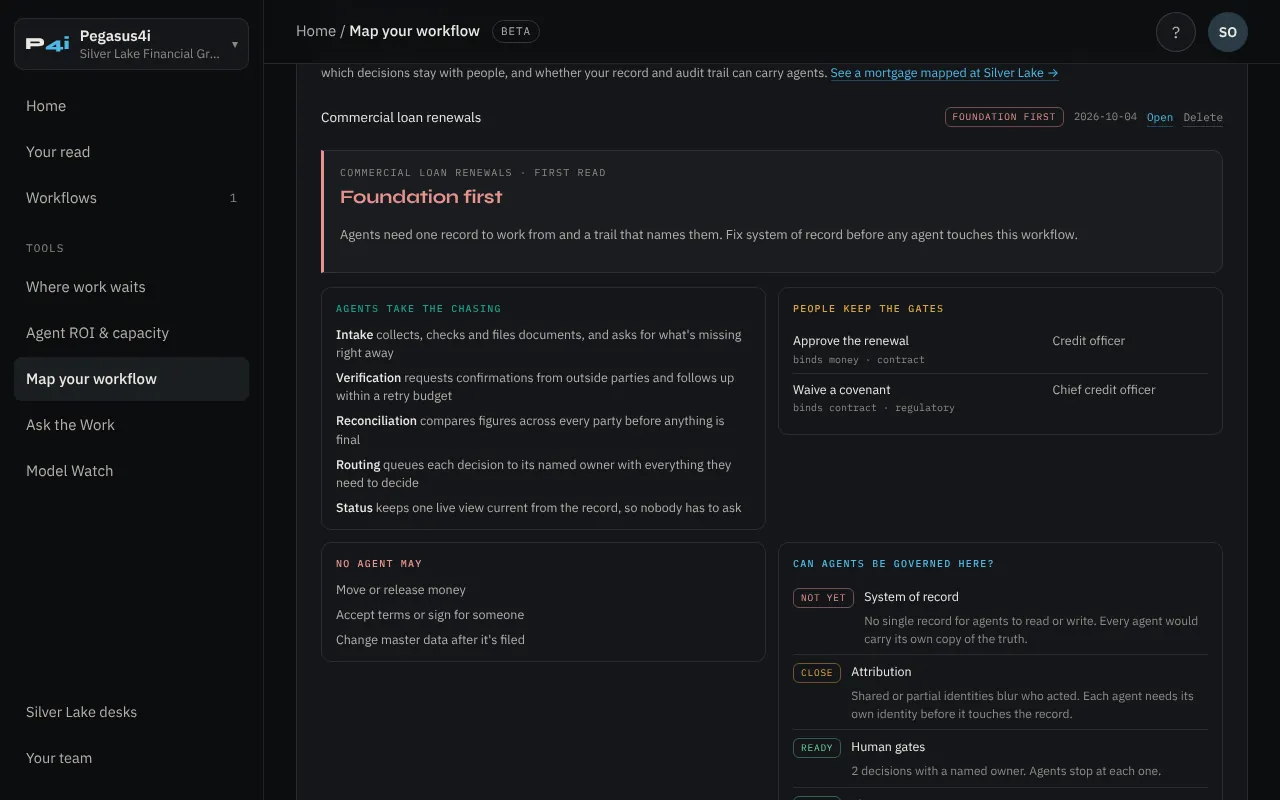
The verdict
- Pilot-ready. Your record and your trail can carry agents. Start with the chasing and keep every gate with its owner.
- Close. Some things to tighten before a pilot; the chasing can be mapped to agents now.
- Foundation first. Agents need one record to work from and a trail that names them. Fix the record or the attribution before any agent touches the workflow.
Below the verdict, Can agents be governed here? rates four things, the record, attribution, human gates and hard limits, as Ready, Close or Not yet, and the last line names the first move. Save the map and it’s filed with the workflow.
08Ask the Work
Questions answered from the Pegasus writing, with the sources named.
Ask in your own words: “What does agent-ready actually look like for an IBM i shop?” or “Where does IBM Bob fit?” Answers come from Reggie Britt’s essays, the Pegasus4i practice material and the Pegasus Collective material on ExO 3.0. Each answer lists the pieces it drew on, and says so when a question falls outside them.
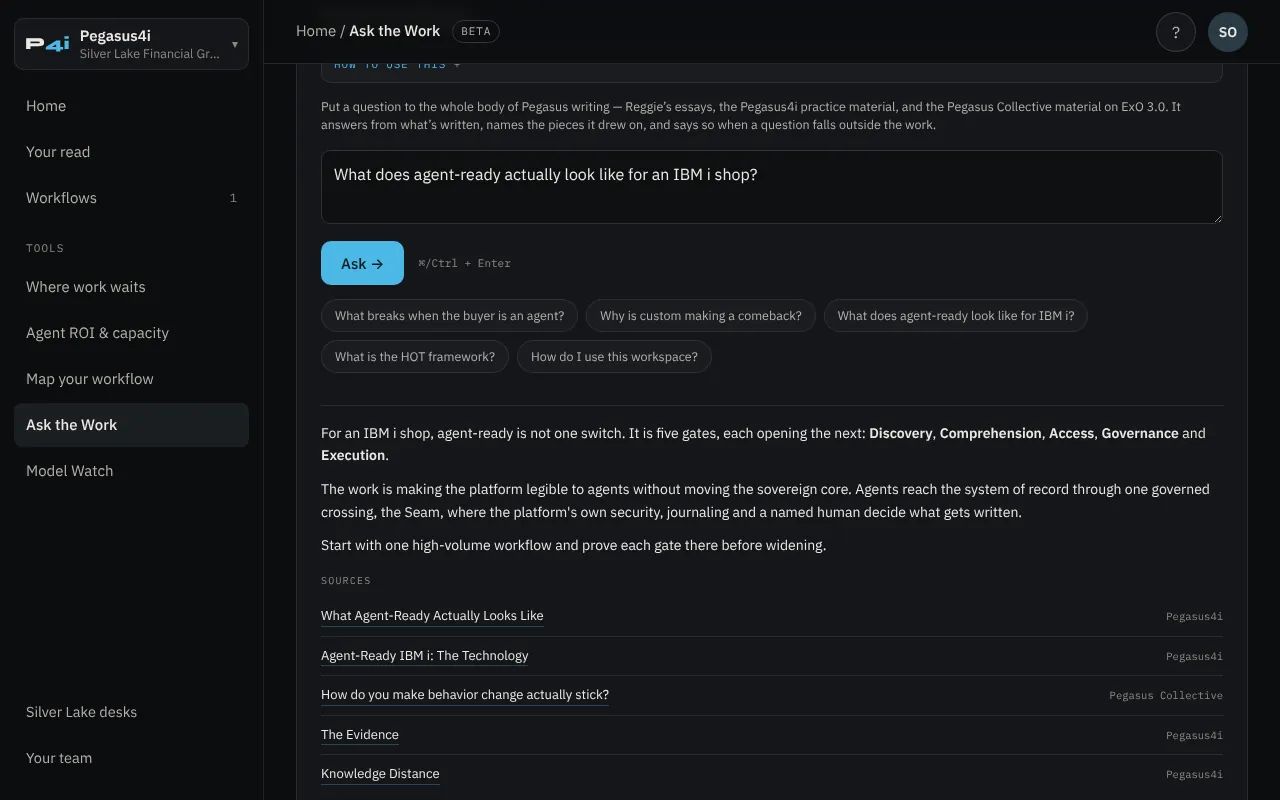
- Your recent questions stay listed under the box, so you can come back to them.
- Each profile can ask up to 20 questions a day.
- It’s a reading aid, not advice about your environment. Take anything specific to your shop to your team.
09Model Watch
The open and closed model landscape, one line each, every row dated.
A maintained table of the AI models worth knowing about, so planning and placement work can cite one source. Each row shows the lab and country, whether the weights are open, the license, sizes, context, capability and price.
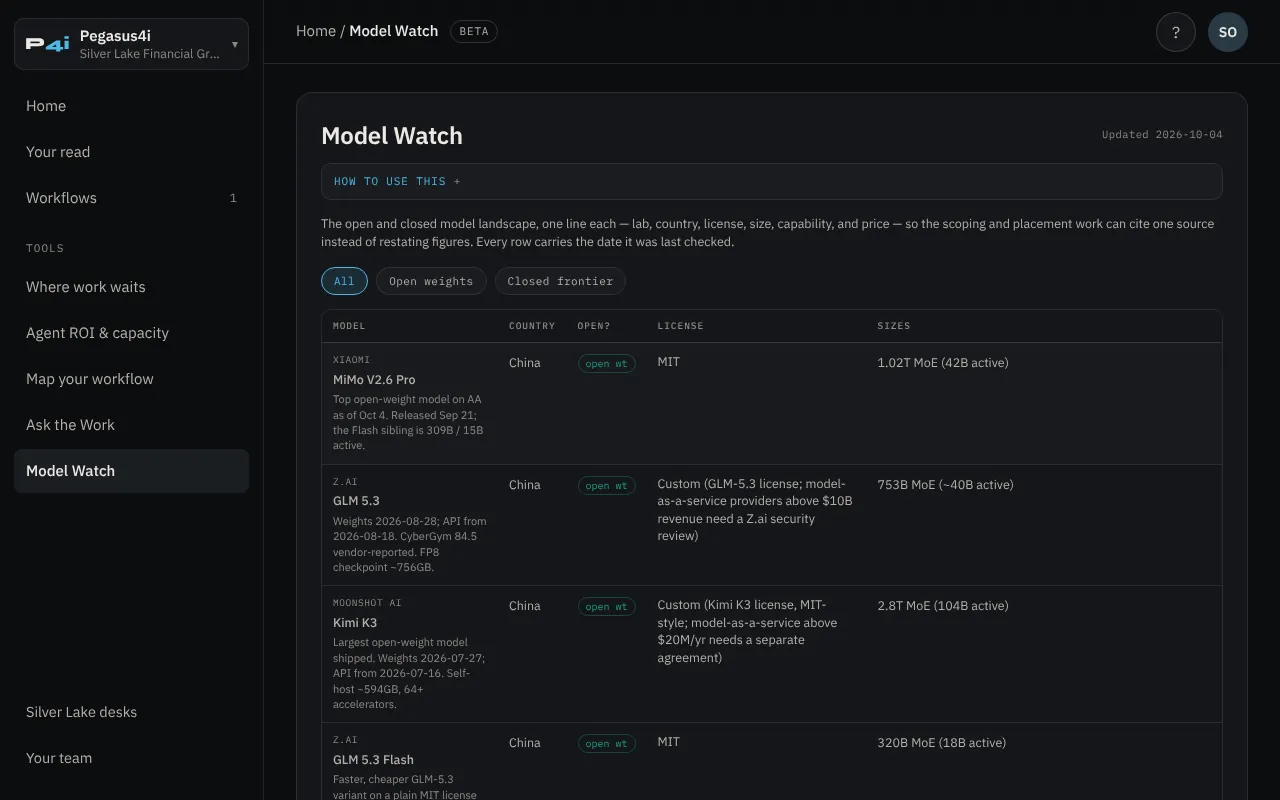
- Capability is the Artificial Analysis Intelligence Index where a row shows a score, with its version and the date it was read; rows without one say why.
- Price is the provider’s list rate per million tokens; a blank means self-hosted weights only.
- Every row carries the date it was last checked. Anything not confirmed is marked verify.
10Silver Lake desks
A governed agent team running on IBM i, that you can operate yourself.
Silver Lake Financial Group is a fictitious lender we built to show the work end to end. Silver Lake desks in the menu opens four of them:
- LoanIQ prequal desk runs live: watch identity, scope, decision and audit happen in seconds as an agent crosses into the lender’s system on IBM i.
- Home loan, orchestrated walks a loan with five scoped agents and four human gates. You decide each gate.
- Agent checkout, governed runs live in test mode at a partner store: set which agents get in, then try to get past the door.
- Home loan, redesigned shows the Organization side: a 13-week Edge Twin pilot and the call leadership makes at week 13.
The prequal crossing and the store run live; the home loan is illustrated. Nothing is really lent or sold. The desks are there so you can see what a governed agent team looks like before you plan your own.
11Your engagement and your team
Every stage of working with Pegasus4i, and the people who carry it.
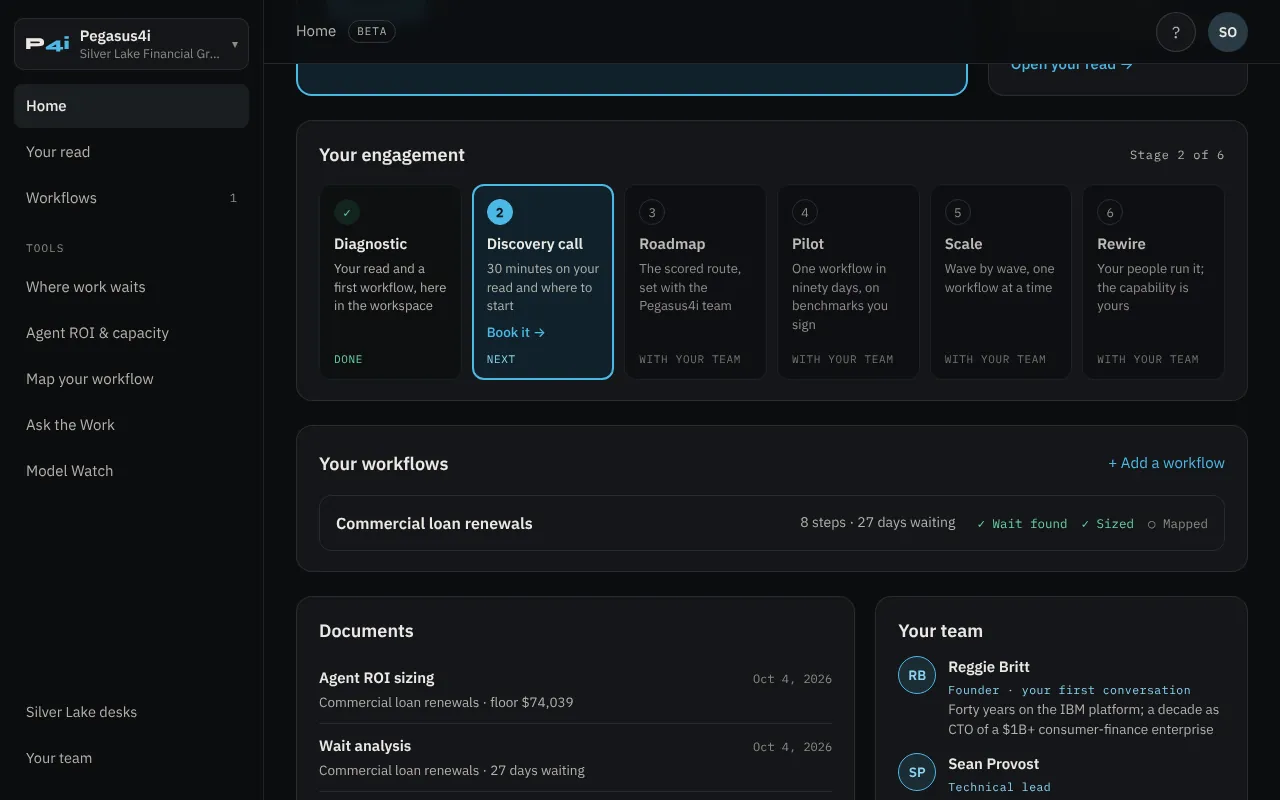
- DiagnosticYour read and a first workflow, here in the workspace. Free.
- Discovery call30 minutes on your read and where to start. Free. Book it from the tracker or the team panel.
- RoadmapThe scored route, set with the Pegasus4i team.
- PilotOne workflow in ninety days, on benchmarks you sign before we build, while today’s systems keep running. The test is how often your people need to override the agents, falling over time. A Blueprint, if you want one, is built alongside.
- ScaleWave by wave, one workflow at a time.
- RewireYour people run it; the capability is yours.
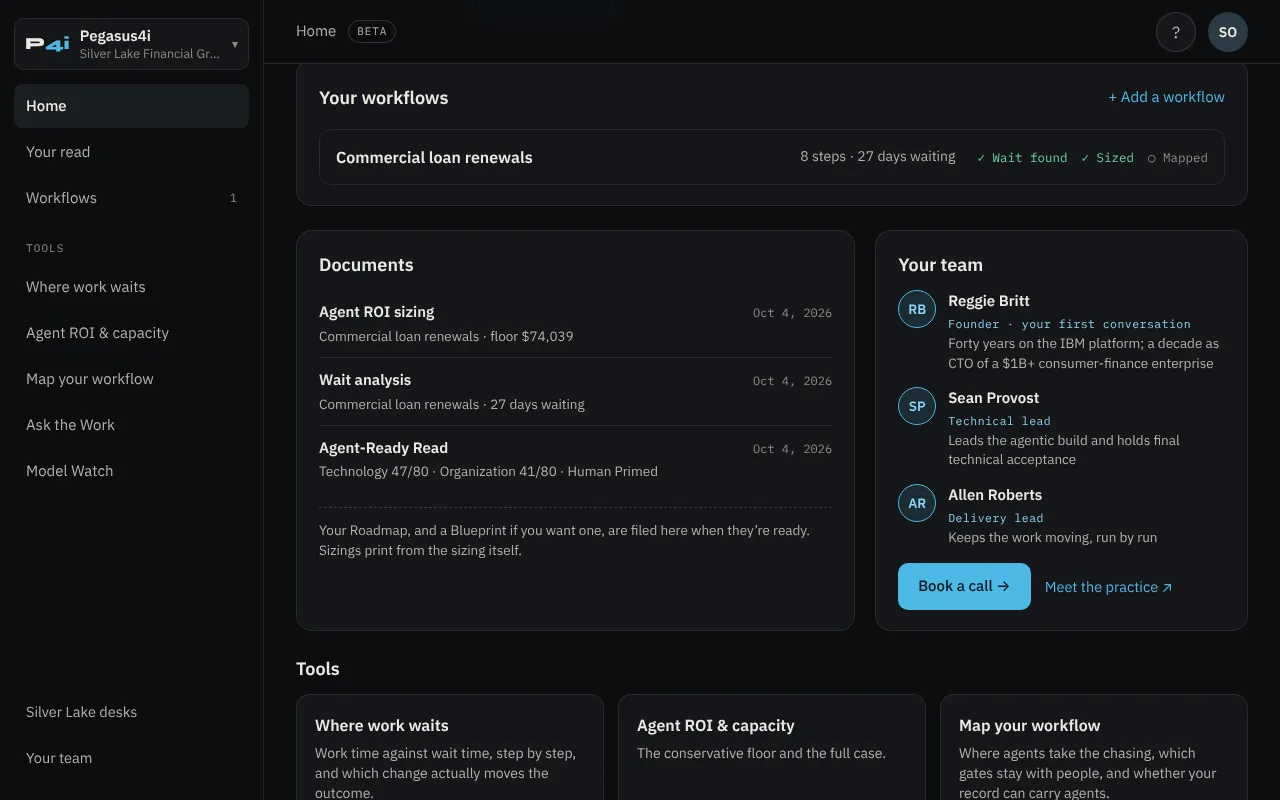
Your team shows who carries your engagement: Reggie Britt, founder, for your first conversation; Sean Provost, technical lead, who leads the agentic build and holds final technical acceptance; and Allen Roberts, delivery lead. Book a call opens Reggie’s calendar.
12Your data
What we keep, who sees it, and how to remove it.
- What’s stored: your email, and your name and company if you add them; your consent; your reads; the results you save in each tool and the questions you ask Ask the Work; a simple record of which tools you use, so your next step and your engagement stay current; and the session cookie and network address that keep you signed in securely.
- Who sees it: you, the Pegasus team working with you, and the service providers that run the workspace under contract (Cloudflare for hosting and the database, Resend for email, and Anthropic, whose model writes the answers in Ask the Work). Site usage is counted with Plausible, which doesn’t use cookies. We don’t use it for advertising, and we don’t sell or rent it to anyone.
- Removing it: ask us to close your workspace or delete your data through the contact page or at privacy@pegasussource.ai. We delete or anonymize it within a reasonable period.
The full terms are in the Privacy Notice.
13Getting help
The ? at the top right of every workspace page.
- Replay the walkthrough: the six-stop tour of your home page.
- Ask a how-to question: Ask the Work knows the workspace too.
- Read the workspace guide: this page.
- Talk to a person: book a free 30-minute call.
Every tool also has a How to use this box at the top with the short version of its section here.
Pegasus4i, Collective and Source
One profile opens all three Pegasus workspaces. The button at the top of the menu switches between them: Pegasus4i for IBM i, Pegasus Collective for organization-wide transformation on ExO 3.0, and Pegasus Source for agent commerce and shops not on IBM i. Your reads and saved work stay the same.
Pegasus4i · a practice of Pegasus Source · pegasus4i.ai · Privacy Notice · Workspace tools are in beta and change often; this guide is kept current at app.pegasussource.ai/guide.